Wireless CarPlay Adapters: A Complete Buying Guide
Everything I check before buying a wireless CarPlay adapter, from chipsets to compatibility, so you skip the junk and get one that just works.

Key takeaways
- Confirm your car has factory wired CarPlay first, since every adapter plugs into that existing port.
- Chipset and RAM matter more than brand name for smooth, lag-free playback.
- Expect to spend $50 to $120 for a reliable unit; sub-$30 dongles usually disappoint.
- Check the firmware update path and return policy before you buy.
- Overheating and slow boot times are the two complaints worth researching per model.
You just unboxed a new phone with no headphone jack and no patience for cables, then you slide into your car and remember you still have to fish out a USB cord every single time. Annoying, right?
A little box the size of a matchbook fixes that. It tricks your factory system into thinking your phone is still plugged in, while your phone talks to it over Wi-Fi and Bluetooth. I have installed and tested dozens of these across everything from a base-model Toyota Corolla to a loaded Ford F-150.
The catch is that the market is flooded with near-identical looking dongles, and the gap between a great one and a frustrating one is bigger than the photos suggest. Here is how I sort the good from the garbage.
First, make sure your car is even a candidate
This is the step most people skip, and it burns them. A wireless adapter does not add CarPlay to a car that never had it. It converts wired CarPlay into wireless.
So the very first thing to confirm: does your car already show CarPlay when you plug your iPhone in with a cable? If yes, you are in business. If your screen does nothing when you plug in, an adapter will not help you, and you need a different solution entirely.
Watch out
Some cars from around 2016 to 2018 have wired CarPlay but a picky USB port. If your factory CarPlay only works from one specific USB jack (usually the one with a little phone icon), that is the port your adapter must live in.
One more wrinkle. A handful of newer vehicles ship with wireless CarPlay already built in. If yours does, you do not need an adapter at all. Apple keeps a running list of supported vehicles on its CarPlay support page that is worth a two-minute look.
The parts inside that actually decide quality
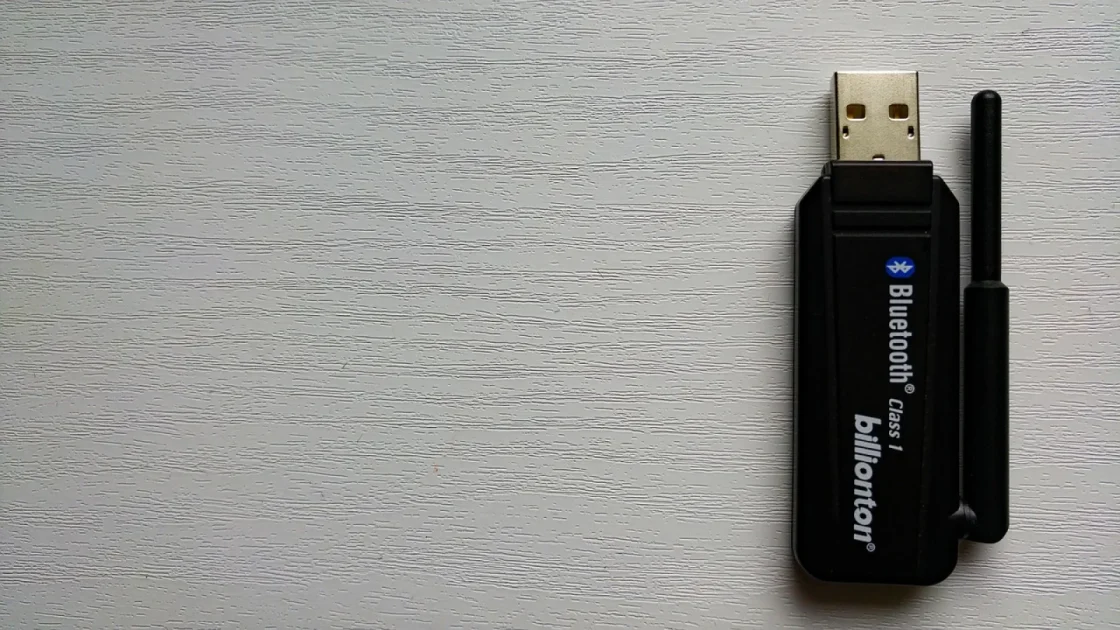
Every one of these dongles looks the same from the outside. The difference lives in the chipset, the RAM, and the wireless radios.
Cheaper units run older, slower processors with 128MB of RAM. They boot slowly, stutter when you swipe through Apple Maps, and choke if you get a call while navigating. The better ones use a faster chip with 512MB or more, and the difference is night and day.
Wi-Fi band is the sleeper spec
Your phone and the adapter stream video over Wi-Fi. A unit that only supports 2.4GHz will feel laggy in a parking lot full of other signals. Look for dual-band with 5GHz support, which is where the smooth ones separate themselves.
Good to know
The adapter creates its own tiny Wi-Fi network between it and your phone. It does not use your home internet or your phone’s data plan. That is why it works fine in a tunnel with zero signal.
What you should actually pay
Price roughly tracks quality here, up to a point. I have mapped out the tiers I see most often so you know where your money goes.
| Price range | What you typically get | My take |
|---|---|---|
| Under $30 | Slow chip, 2.4GHz only, no updates | Skip it |
| $50 to $80 | Faster chip, dual-band Wi-Fi, decent app | Sweet spot for most people |
| $90 to $120 | Top chipsets, fast boot, regular firmware | Worth it if you drive daily |
| $130 and up | 2-in-1 CarPlay and Android Auto, extras | Only if you truly need both |
The $50 to $80 band is where most drivers land and stay happy. Spending more than $120 rarely buys you a better daily experience unless you need the Android Auto side too.
The specs and features worth chasing
Once you are past the basic chipset question, a few features genuinely change how the thing feels day to day.
- Fast boot time: good units connect in 10 to 20 seconds, weak ones take a full minute
- Firmware updates through a phone app, so bugs get fixed over time
- A physical vent or metal housing that sheds heat instead of trapping it
- USB-C connector, or at least an adapter tip that matches your car’s port
- Auto-reconnect that grabs your phone the moment you sit down
That heat point deserves attention. These little boxes run warm, and a cheap plastic shell with no ventilation will throttle itself on a hot day. I have watched a bargain unit drop its connection every ten minutes in July because it cooked itself. A model with an aluminum body handles a Phoenix summer far better.
Pro tip
If your car has a USB port tucked inside a closed center console, route a short extension cable so the adapter sits out in open air. That single change fixes more overheating complaints than any firmware update.
Red flags in listings and reviews
Product photos all look the same, so I read reviews with a specific checklist. Certain complaints show up again and again on the units to avoid.
Watch for reviewers mentioning a connection that drops after a few weeks, a boot time creeping past 45 seconds, or an app that has not been updated in over a year. Any brand that ignores firmware is telling you they will not fix problems later.
The single best predictor of a happy owner is an active firmware update history. A company that keeps shipping fixes is a company that stands behind the box.
I also give weight to the return window. A generous 30-day return policy signals the seller trusts their product in the messy reality of hundreds of different car models. Buy from a place that lets you send it back if your specific car turns out to be fussy.
Matching the adapter to your phone and habits
Almost every wireless CarPlay adapter works with any iPhone running a reasonably current version of iOS. Apple standardized the handshake years ago, so a modern iPhone 12 through iPhone 16 will all pair fine.
Your habits matter more than your phone model. If you take a lot of calls while driving, prioritize a unit with a fast, stable chip so audio does not stutter mid-conversation. If you mostly use navigation on short trips, boot speed becomes the spec you feel most.
Quick note
If anyone in your household drives an Android phone and shares the car, look at a 2-in-1 adapter that handles both CarPlay and Android Auto. It costs a bit more but saves you owning two boxes. You can read the finer points of how those dual units behave in a separate guide.
For the technically curious, the general framework Apple built for this connection is documented well on its official CarPlay page, which helps explain why some cars behave differently than others.
Your next step before you click buy
Here is the short version of what I do before spending a dollar. Plug your iPhone in with a cable and confirm wired CarPlay appears. Note whether your car has one dedicated CarPlay USB port or several.
Then pick a unit in the $50 to $80 range with a dual-band Wi-Fi spec, an aluminum or vented housing, and a review history that mentions recent firmware. Buy from a seller with an easy return policy so you have an escape hatch if your car is one of the odd ones out.
Do those four things and you will land a wireless CarPlay adapter that just works, the kind you forget is even there. That is the whole point: get in, sit down, and your maps and music are already waiting.
Frequently asked questions
No. These adapters only convert existing wired CarPlay into wireless. If your car does not show CarPlay when you plug in an iPhone with a cable, an adapter will not help. You would need a replacement head unit instead.
No. The adapter creates its own private Wi-Fi link directly to your phone for streaming the display. All your maps and music still pull data through your phone's normal connection, exactly as they would with a cable. The adapter itself uses no data.
Budget units use slow processors, minimal RAM, and often a single 2.4GHz Wi-Fi band that gets crowded in busy areas. That combination causes stutter when you swipe maps or take a call. Spending $50 to $80 for a faster chip and dual-band Wi-Fi usually removes the lag entirely.
A good unit reconnects in roughly 10 to 20 seconds once you sit down and the car powers on. If yours regularly takes 45 seconds or longer, that points to a weak chipset or outdated firmware. Some of that delay can improve with an app update.
Practically yes. Any iPhone running a fairly current version of iOS pairs without issue, since Apple standardized the wireless CarPlay handshake years ago. An iPhone 12 through the latest models all connect the same way. Older phones may need an iOS update first.
Keep reading
Related guides
Do Wireless CarPlay Adapters Drain Your Battery?
A straight answer on what these little dongles do to your phone's charge and your car's battery, based on real driving.
Read guide
Adapter vs New Head Unit: The Cheaper Path to Wireless
A small dongle can give you wireless CarPlay for a fraction of a stereo swap, if your car already has the right setup.
Read guide
Will a Wireless CarPlay Adapter Work With My Car?
A plain-language checklist for figuring out if a wireless CarPlay dongle will actually work in your car before you spend a dime.
Read guide